Highlights
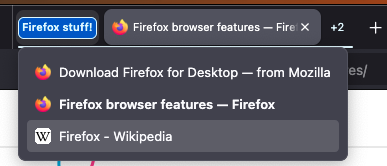
- Collapsed tab group hover preview is going live in Firefox 145!
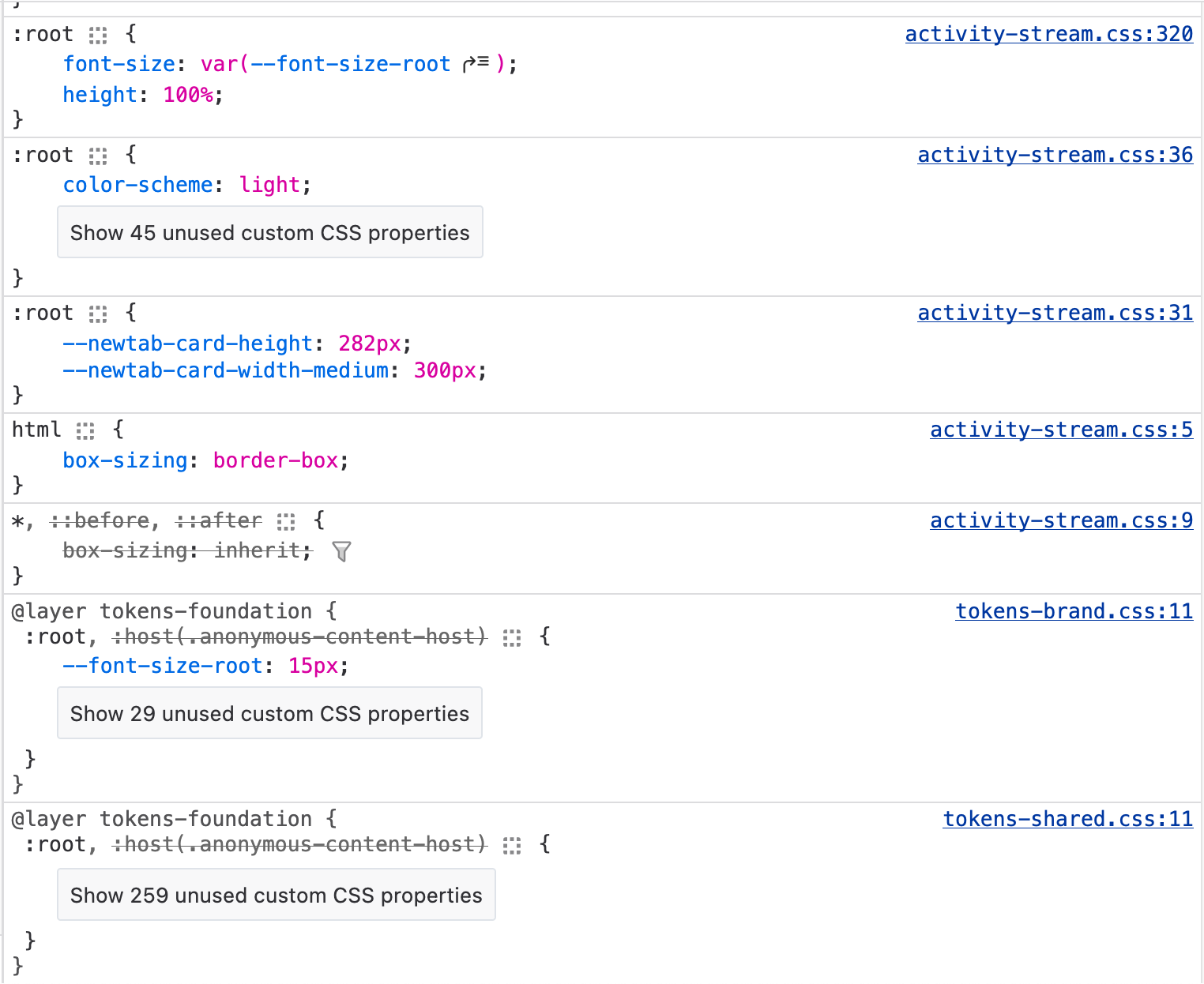
- Nicolas Chevobbe added a feature that collapses unreferenced CSS variables declarations in the Rules view (#1719461)
- Alexandre Poirot [:ochameau] added a setting to enable automatic pretty printing in the Debugger (#1994128)
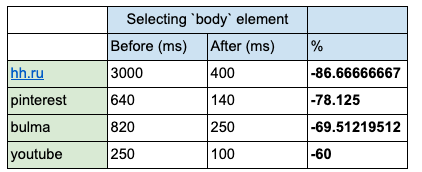
- Improved performance on pages making heavy usage of CSS variables
- Jared H added a “copy this profile” button to the app menu (bug 1992199)


Friends of the Firefox team
Resolved bugs (excluding employees)
Volunteers that fixed more than one bug
- Khalid AlHaddad
- Kyler Riggs [:kylr]
New contributors (🌟 = first patch)
- Alex Stout
- Khalid AlHaddad
- Jim Gong
- Mason Abbruzzese
- PhuongNam
- Thomas J Faughnan Jr
- Mingyuan Zhao [:MagentaManifold]
Project Updates
Add-ons / Web Extensions
WebExtensions Framework
- Fixed an issue that was preventing dynamic import from resolving moz-extensions ES modules when called from content scripts attached to sandboxed sub frames – Bug 1988419
- Thanks to Yoshi Cheng-Hao Huang from the Spidermonkey Team for looking into and fixing this issue hitting dynamic imports usage from content scripts
Addon Manager & about:addons
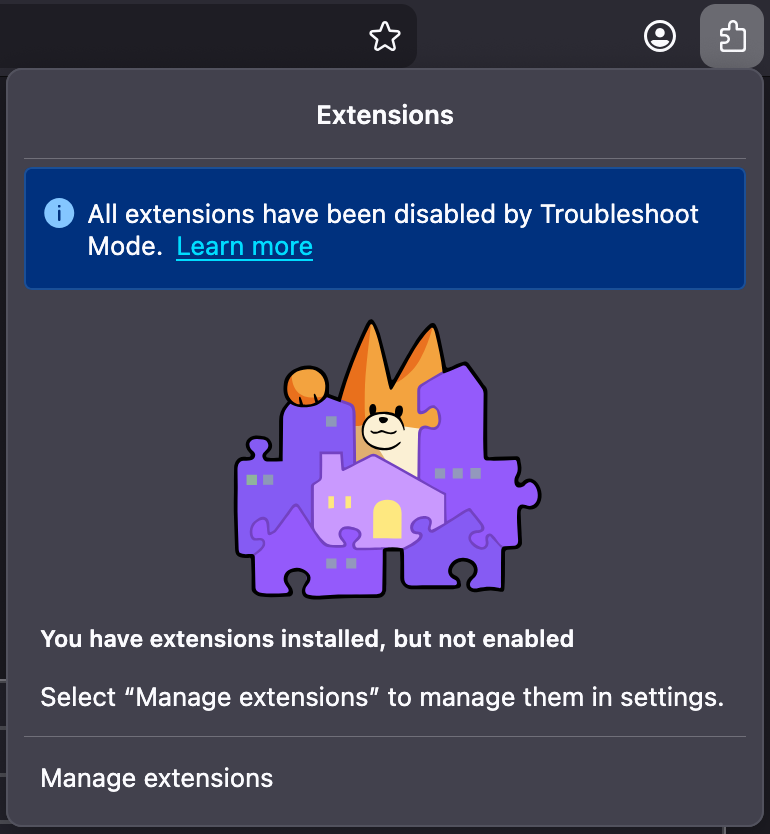
- As a followup to the work to improve the extensions button panel’s empty states, starting from Nightly 146 Firefox Desktop will be showing a message bar notice in both the extensions button panel and about:addons to highlight to the users when Firefox is running in Troubleshoot mode (also known as Safe mode) and all add-ons are expected to be disabled, along with a “Learn more link” pointing the user to the SUMO page describing Troubleshoot mode in more details – Bug 1992983 / Bug 1994074 / Bug 1727828
DevTools
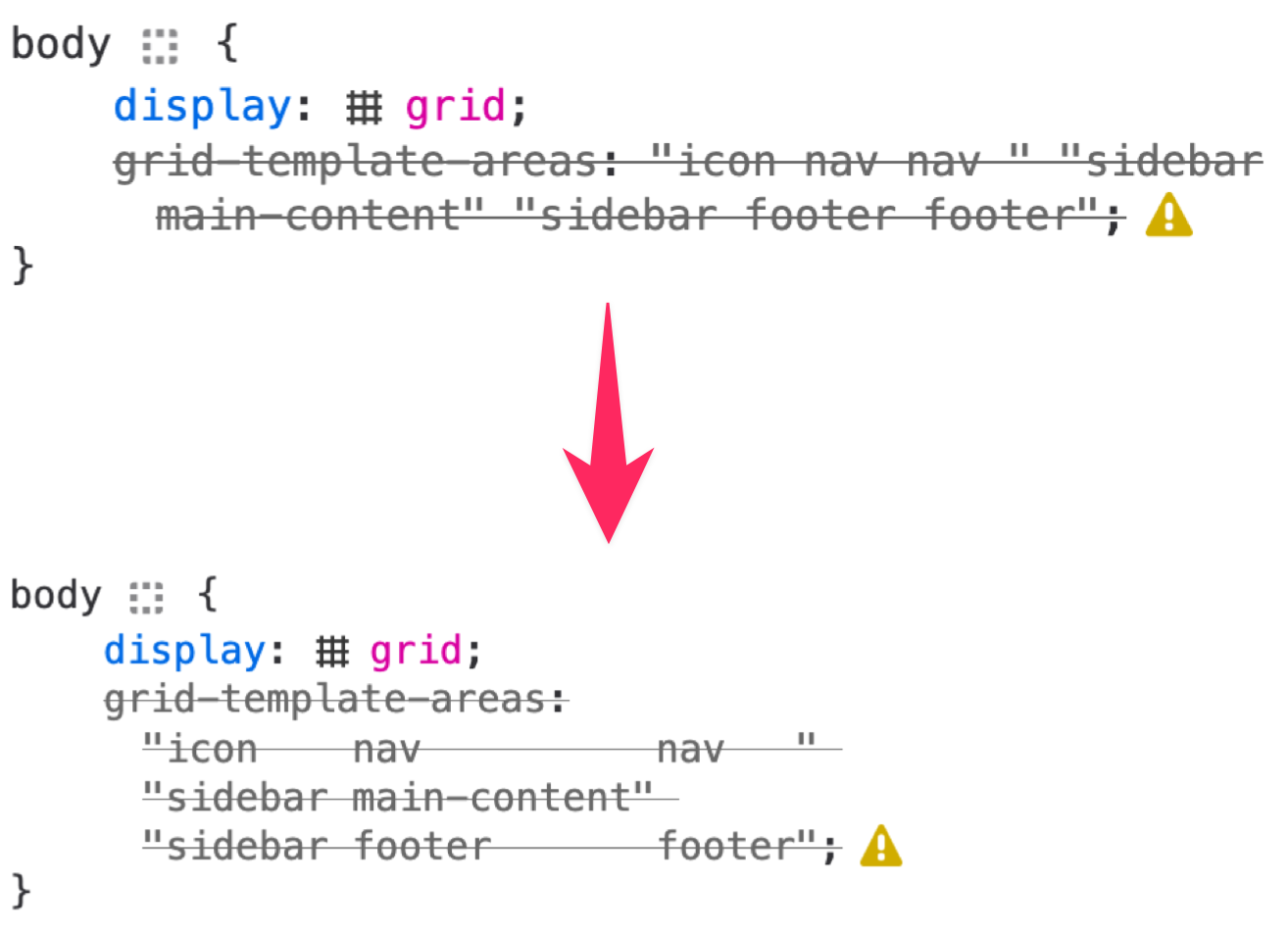
- gopi made the Rule view format grid-template-areas even when the value is invalid (#1940198)
- Emilio Cobos Álvarez fixed an issue where editing constructed Rule in the shadow DOM would make them disappear (#1986702)
- Nicolas Chevobbe fixed a bug that would render erroneous data in the var() tooltip for variables defined in :host rule on shared stylesheet (#1995943)
- Julian Descottes improved inspector reload time when shadow DOM element was selected (#1986704)
- Hubert Boma Manilla fixed an issue where we could have duplicated inline preview when paused in the Debugger (#1994114)
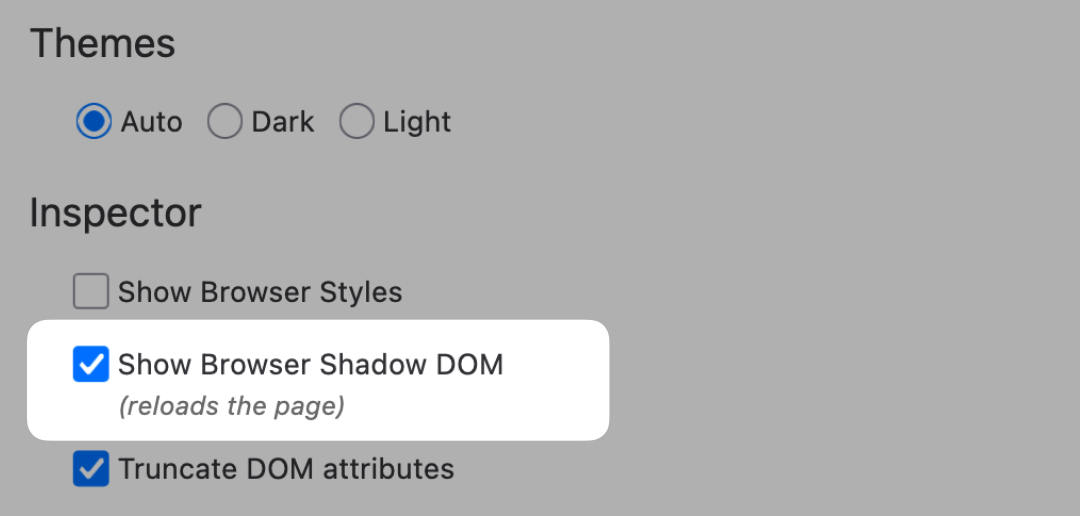
- Nicolas Chevobbe [:nchevobbe] exposed devtools.inspector.showAllAnonymousContent in the settings panel (#1995333)
WebDriver
- Khalid added a dedicated switch_to_parent_frame method to the WebDriver Classic Python client, and renamed the existing switch_frame method to switch_to_frame for consistency with the WebDriver specification.
- Julian updated the network.getData command to return response bodies for requests using the data: scheme.
- Julian fixed a bug where different requests would reuse the same id, which could lead to unexpected behaviours when using commands targeting specific requests (e.g. network.provideResponse, network.getData etc…).
- Sasha updated the reset behaviour of “emulation.setLocaleOverride” and “emulation.setTimezoneOverride” commands to align with the spec changes. With this update, when calling these command to reset the override for e.g. a browsing context, only this override will be reset and if there is an override set for a user context, related to this browsing context, this override will be applied instead.
Lint, Docs and Workflow
- ESLint
- We are working on rolling out automatically fixable JSDoc rules across the whole tree. The aim being to reduce the amount of disabled rules in roll-outs, and make it simpler for enabling JSDDoc rules on new areas.
- jsdoc/no-bad-blocks has now been enabled.
- jsdoc comments are required to have two stars at the start, this will raise an issue if it looks like it should be a jsdoc comment (e.g. has an @ symbol) but only one star.
- jsdoc/multiline-blocks has also been enabled.
- This is being used mainly for layout consistency of multi-line comments, so that the text of the comment does not start on the first line, nor ends on the last line. This also helps with automatically fixing other rules.
- jsdoc/no-bad-blocks has now been enabled.
- We are working on rolling out automatically fixable JSDoc rules across the whole tree. The aim being to reduce the amount of disabled rules in roll-outs, and make it simpler for enabling JSDDoc rules on new areas.
- StyleLint
- More rules have been enabled – background-color tokens, space tokens, text-color tokens, box-shadow tokens
- A new rule has been added to prevent using browser/ css files in toolkit/
Migration Improvements
- We’ve disabled the IE migrator by default now, since IE (the separate browser, not the compatibility mode) stopped being supported by Microsoft in 2022. We will let this ride to release, and then begin the work of removing support entirely.
- To help users migrate their data off of Windows 10, we’ve revived the Backup effort, and have landed a number of fixes:
- Restores now preserve the user’s default profile if it was default pre‑backup, and the prior profile is renamed to old-[profile name] for clarity. This prevents unexpected startup profiles after a restore and makes rollback obvious in Profile Manager.
- The restore file picker (restore modal and about:welcome restore) now opens at the detected backup location, cutting navigation friction and errors.
- The primary CTA label in about:preferences updates correctly (“Manage backup” → “Turn off backup”) immediately after enabling, aligning UI state with functionality.
- The “Backup now” button is hidden until backup is enabled, avoiding a dead‑end action and guiding users through the correct setup sequence.
- Enterprise policy prefs were added for fxbackup, enabling admins on Windows/macOS/Linux to enforce/lock backup availability and behavior for managed users.
- Error and warning banners in about:preferences were updated to match spec for clearer state and failure messaging.
- The backup HTML archive support link now points to the correct documentation.
- Copy updates clarify what cookie data is included in backups, improving user expectations and privacy transparency.
New Tab Page
- We successfully train-hopped New Tab version 145.1.20251009.134757 to 100% of the release channel on October 20th!
- New Tab defaults and freshness: DiscoveryStream cache now expires when browser.newtabpage.activity-stream.discoverystream.sections.enabled changes, so toggling layouts updates content immediately. First‑run shows far fewer placeholders, improving perceived load. Startup correctness improves by keying the about:home startup cache on the newtab add-on version.
- Accessibility, keyboard, and RTL: Fixed a broken focus order where Settings jumped ahead of Weather. For Windows High Contrast Mode, story cards no longer disappear on hover and get clearer visuals. RTL locales now get intuitive reversed arrow-key navigation across story cards.
- Weather opt-in and reach: Opt-in flow now surfaces “Enable current location” and adds a “Detect my location” context-menu action; availability expands to more regions, reducing setup friction and increasing coverage.
- Visual polish and correctness: Standardized opacity plus hover/blur effects make story cards feel more responsive; made sure the search bar stays vertically centered while scrolling. Medium refined cards now show longer publisher names without affecting small cards.
- Wallpaper and language fixes: Missing custom wallpaper thumbnails now load reliably, and a friendly error state appears if Remote Settings wallpapers fail. The language switcher no longer lists add-on locales, restoring expected language selection.
Performance Tools (aka Firefox Profiler)
- Marker tooltips now have a ‘filter’ button to quickly filter the marker chart to similar markers:

- Link to the profile in the screenshot: https://share.firefox.dev/42kDTuf (and after filtering: https://share.firefox.dev/4gQHPsx)
- This is a resource usage profile of an xpcshell test job. To see them, select a test job in treeherder and press ‘g’.
Profile Management
- Profiles is rolling out to all non-win10 users in 144, looking healthy so far
- Niklas refactored the BackupService to support using it to copy profiles (bug 1992203)
- Jared H added per-profile desktop shortcuts on Windows (bug 1958955), available via a toggle on the about:editprofile page
- Dave fixed an intermittent test crash in debug builds (bug 1994849) caused by a race between deleting a directory and attempting to open a lock file. nsProfileLock::LockWithFcntl now returns a warning instead of an error in this case.
Search and Navigation
- New Features
- We are working on enabling better search suggestions in the address bar (link to blog post).
- Mandy has rolled out Perplexity as a new engine to all users
- Google Lens is being rolled out to users in 144 with additional in-product demoing.
- Address Bar
- Daisuke has implemented a prototype for flight status suggestions @ 1990951 + 1994317
- Dale has been working on enabling the unified trust panel @ 1992940 + 1979713
- Dale introduced Option + Up / Down as a keyboard shortcut to open the unified search panel @ 1962200
- Moritz removed the code for “Add a keyword for this search” as it was deprecated functionality @ 1995002
- Search
- Mandy and Drew have been working on releasing the visual search + messaging @ 1995645
Storybook/Reusable Components/Acorn Design System
- <moz-message-bar> now supports arbitrary content with slot=”message” elements
- Ideally this is still something short, like a message as opposed to inputs, etc
- <moz-message-bar><span slot=”message” data-l10n-id=”my-message”><a data-l10n-name=”link”></a></span></moz-message-bar>
- Note: if you’re using Lit, @click listeners etc set on Fluent elements (data-l10n-name) won’t work, you’ll need to attach it to the data-l10n-id element or another parent
No comments yet
Post a comment