Highlights
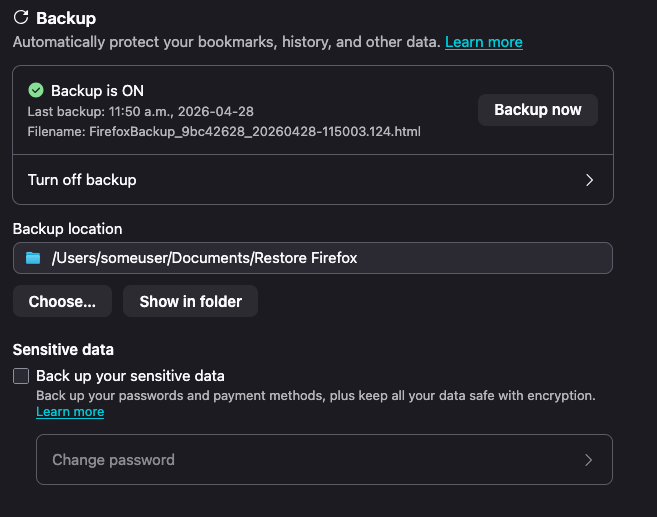
- The profile backup mechanism has been enabled by default for all desktop platforms in Nightly, as well as Beta! The current plan is to have this ride out to Firefox 151 for Windows, macOS and Linux on May 18th!
- This feature, when enabled, will create a copy of your profile data in the background and store it in a single file on your file system that you can restore from.
- You will be able to manage this feature in Settings under Sync (for now)
- You can read more about the feature here
- As followups to the recent addition to the WebExtension tabs API to support the new SplitView tabs feature, tabs.group() and tabs.ungroup() have been fixed to work correctly with split view tabs, and fixed split views being prepended instead of appended to tab groups when adopted into a new window – Bug 2029099 / Bug 2029534
- Adaptive autofill has been enabled on Nightly.
- Previously, autofill only completed domains (e.g. typing red autofilled reddit.com). Now it can also complete full URLs for pages you visit often (e.g. red → reddit.com/r/firefox), learning from what you actually click in the address bar. If a suggestion isn’t helpful, you can now dismiss it so autofill learns what not to show you too.
- If you run into issues or have feedback, you can file a bug here!
- Previously, autofill only completed domains (e.g. typing red autofilled reddit.com). Now it can also complete full URLs for pages you visit often (e.g. red → reddit.com/r/firefox), learning from what you actually click in the address bar. If a suggestion isn’t helpful, you can now dismiss it so autofill learns what not to show you too.
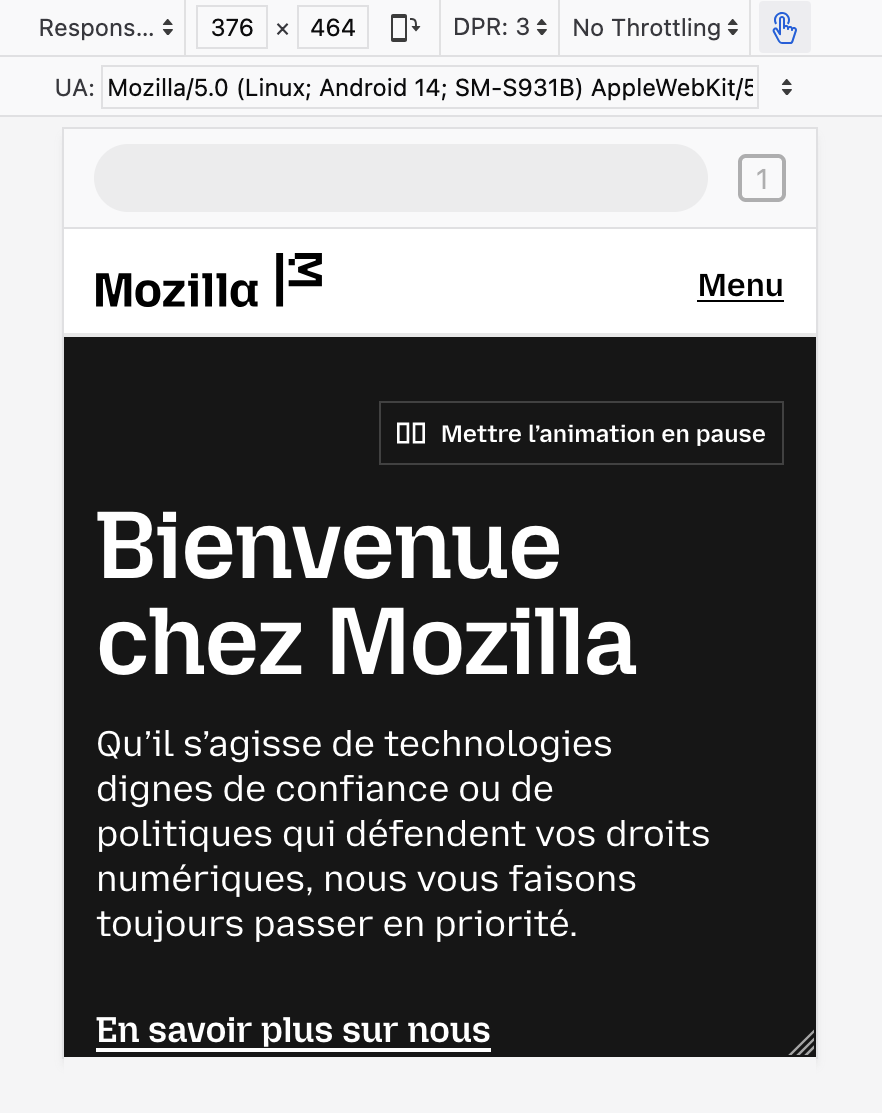
- Markus Stange [:mstange] implemented dynamic toolbar on top in RDM (#1978145), but also implemented some static skeleton UI so it’s closer to what we actually have in Firefox for Android
- dynamic toolbar is behind a pref: devtools.responsive.dynamicToolbar.enabled
- it can be put on top by setting devtools.responsive.dynamicToolbar.onTop, otherwise it’s at the bottom
Friends of the Firefox team
Resolved bugs (excluding employees)
Script to find new contributors from bug list
Volunteers that fixed more than one bug
- Amin Amir
- aoia7rz7l
- Chukwuka Rosemary
- DrSeed
- Frédéric Wang Nélar
- japandi
- John Iweh
- jonathancabera
- Josh Aas
- Keji Bakare
- kofoworola shonuyi
- konyhéa
- liz
- Mathew Hodson
- Okhuomon Ajayi
- Oluwatobi
- ROSHAAN
- Sam Johnson
New contributors (🌟 = first patch)
- Anthony Mclamb: Disable the legacy Edge migrator
- Amin Amir
- any1here: install_sig_alt_stack incorrectly checks mmap’s return value
- 🌟 Armin Ulrich: Fix MessageHandlerRegistry.sys.mjs calling getExistingMessageHandler with an unused second argument
- japandi
- Nathan Johnson [:narjoDev]: Remove browser.display.use_system_colors pref
- DrSeed
- Keji Bakare:
- 🌟 gotyaoi: Reload toolbar button is active on about:newtab
- Itoro James: [A11y][Keyboard Navigation]Cancelling a note via Keyboard Navigation still saves it
- John Iweh: The notification dot is not displayed if the tab is in a Split View
- 🌟 John Iweh: sidebar-shown attribute remains when sidebar.revamp is false
- 🌟 jonathancabera:
- The Move tab to Split View option is also displayed for the tabs that are within the Split View
- A Note with long text (1003 characters) is saved by pressing ENTER even if the “Save” button is disabled
- Tab group guide line becomes disconnected under certain conditions related to split views in vertical tab mode
- Aloys: Remove logic that forces distribution language packs to be reinstalled when upgrading from Firefoxes older than 67
- liz:
- Mary cathline: Tab Group Label does not respect touch density in vertical tab bar
- 🌟 Brandon Lucier: Popups opened with window.open give window type normal instead of popup
- karan68: [dialog] New Shortcut dialog needs a label/accessible name
- 🌟 Vector: Button does not programmatically indicate that it opens a dialog (Recent activity section > story card > ••• disclosure > Delete from History button)
- 🌟 Osoble: Update font size and weight for synced tabs device name headers in Firefox View
- konyhéa:
- Add test for sync admin disabled to browser_syncedtabs_errors_firefoxview.js
- Check all second paramaters for TestUtils.waitForCondition in Fx View test files
- Recently Closed Tabs, Tabs from Other Devices, and History pages should have Cmd / Ctrl + Click on a link open the link in the new background tab.
- Noble Chinonso: #shouldHandleEvent in SidebarTreeView.js compares event.keyCode to string values, causing Home/End keys to never be handled
- Pranjali Srivastava: Add a test to verify that the space above tabs is consistent across PB, LWT and sizemode (where appropriate)
- Okhuomon Ajayi:
- More spacing is needed between the tab note icon and the close icon on the tab
- The tabs in vertical mode collapsed state are positioned differently in Split View
- Keep vertical split view tabs stacked vertically even when the sidebar is expanded when expand on hover is enabled
- Vertical split view tabs can be too big or small when tabs are overflowing
- 🌟 Rishan: Fix duplicated arrow function in browser_history_sidebar.js
- Chukwuka Rosemary:
- ROSHAAN:
- Sameeksha: Disclosure button expanded/collapsed state not programmatically defined (Customize button)
- kofoworola shonuyi:
- 🌟 Sayd Mateen: Page URL is displayed as tab name when page’s contains about:reader?</a></p> <p>
- Oluwatobi:
- Nishchay [:nish]: Unable to add tabs to old closed tab groups (tabGroupState.splitViews is undefined)
Project Updates
Add-ons / Web Extensions
Addon Manager & about:addons
- In preparation for the Project Nova restyling of the about:addons page, we have refactored about:addons into separate per-component ES modules, splitting the monolithic aboutaddons.js and aboutaddons.html into 16 dedicated component files under components/ (with no behavior or UI changes) – Bug 2032014
- NOTE: if you have working on patches with changes to about:addons internals it is very likely you’ll need to rebase and solve merge conflicts hit on top of this refactoring, the internals are still largely the same as before but don’t hesitate to reach out to the Addons team if you have doubts / questions or need help to figure out how to adapt your patch of top of these changes
WebExtensions Framework
- Fixed exportFunction to preserve the constructibility of the wrapped function instead of unconditionally making all exported functions implicitly as constructors – Bug 2033173
- Thanks to Gregory Pappas for contributing this improvement to the Content Scripts’ Xray Wrappers helpers!
- Fixed a Firefox 151 regression where extension content scripts accessing location.ancestorOrigins caused subsequent page script reads of the same property to fail with “Permission denied”, breaking sites like Gmail – Bug 2034329
- Thanks to Simon Farre for promptly investigating and fixing this recent regression!
WebExtension APIs
- Updated sessions.getRecentlyClosed() to remove the hardcoded cap when maxResults is omitted – Bug 1392125
- Shoutout to Amine Zroual for contributing this enhancement to the sessions WebExtensions API!
DevTools
- Artem Manushenkov fixed an issue where autosuggestion popup was removing overridden indicators from properties in the Inspector (#1983408)
- Andrea Marchesini [:baku] fix DevTools cookie header serialization for long cookies, which could lead to cookies not being visible in Netmonitor (#2031299)
- Julian Descottes [:jdescottes] fixed a toolbox crash that was happening we couldn’t find a localization file (e.g. when using a language pack on Nightly) (#2028930)
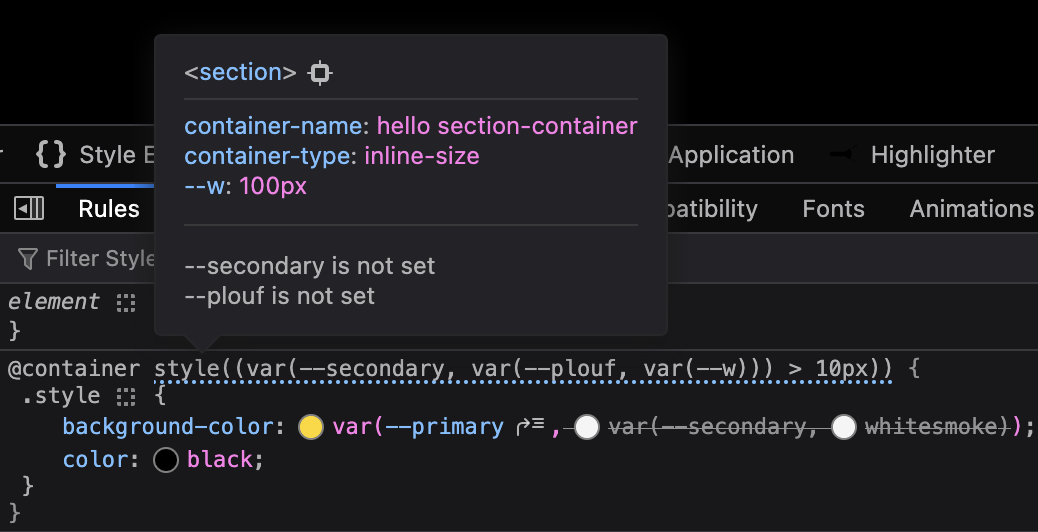
- Nicolas Chevobbe [:nchevobbe] improved @container tooltip so it show the value of variables used in style()(#2030239), has enough contrast in dark mode (#2033782) and contains a link to select the container (#2031688)
- Hubert Boma Manilla (:bomsy) is making good progress on migrating the Console to CodeMirror 6 (#2032758, #2026569)
Fluent
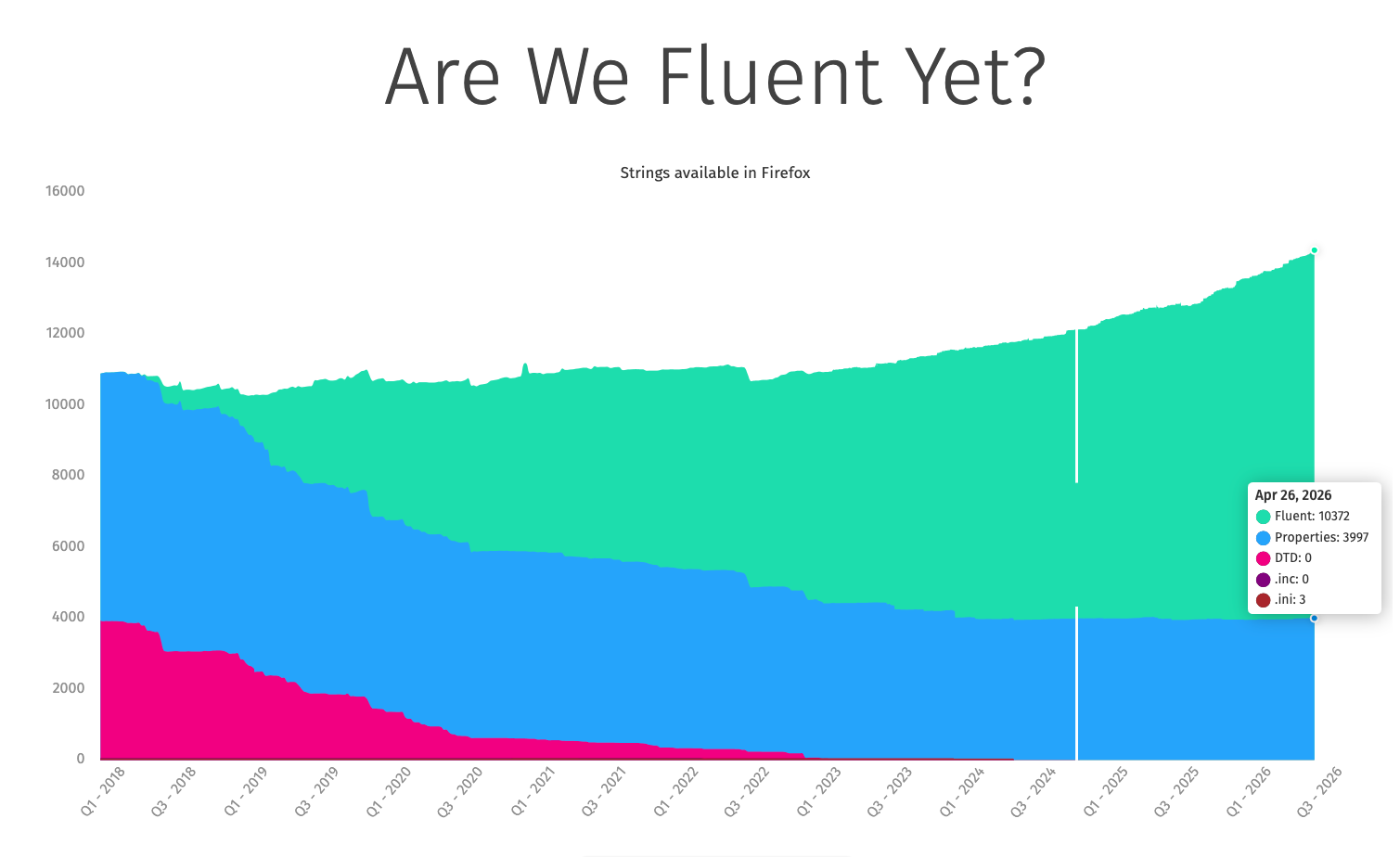
- We’re now at over 72% of our strings being Fluent! Got a component still using .properties? Convert when you can!
Migration Improvements
- Thanks to dao for fixing a recent alignment issue in the migration wizard dropdown
- Thanks to volunteer contributor Anthony Mclamb for his patch that disables the legacy EdgeHTML Edge migrator! Once that finishes rolling out, presuming no surprises, we’ll go ahead and remove the migrator entirely.
New Tab Page
- Nova for New Tab has ridden the trains to Beta! It will be enabled by default, globally, when Firefox 151 goes out to release on May 19th
- It’s possible that we’ll do a train-hop coupled with an experiment to enable HNT Nova for a few clients a bit earlier.
- Maxx Crawford enabled Nova designs for New Tab, rolling out the updated layout, widgets, and customization panel behind HNT Nova flags.
- Maxx Crawford fixed the Nova content feed to render the intended four‑column layout by correcting CSS grid breakpoints.
- Maxx Crawford resolved a first‑load failure in the Weather widget by fixing init order and fetch timing, eliminating the “Oops” error.
- Maxx Crawford synchronized the Weather toggle between about:preferences#home and the panel via the shared showWeather pref to prevent desync.
- Maxx Crawford updated Nova grid focus order to align tab flow with visual order for keyboard users.
- Maxx Crawford fixed critical UI issues in Lists and Timer widgets covering overflow, controls, and layout stability.
- Maxx Crawford guarded document.dir access in Nova render paths to avoid startup cache worker errors and improve startup stability.
- Rolf added a new normalization method for the inferred interest vector to stabilize topic relevance across sessions.
- Rolf prevented unnecessary content refreshes during Pocket New Tab experiments, reducing jank and bandwidth.
- Sameeksha defined the Customize button’s expanded/collapsed state programmatically using aria-expanded for better a11y.
- liz clarified follow/unfollow/blocked button names with topic context so screen readers announce clear actions.
- Vector marked the Delete from History control as opening a dialog via aria-haspopup=dialog for assistive tech.
- Scott Downe fixed a regression that flipped the Wallpapers pref off, restoring user selections.
- Irene Ni corrected privacy link color and focus styles for contrast and keyboard visibility.
- Reem Hamoui added a wallpaper toggle reset in the Nova customization panel so users can quickly restore default wallpapers without extra steps.
- Reem Hamoui fixed the Customize pencil button to match the Nova spec, aligning placement and iconography for visual consistency.
- Dre updated the ‘Fresh new’ wallpapers copy to a clearer, localized message for better comprehension.
- Irene Ni fixed Nova privacy link color and focus styles to meet contrast and focus ring guidelines, improving accessibility on New Tab.
- Irene Ni adjusted Sponsored tile character limits to prevent truncation/overflow, yielding cleaner titles across grid and wide tiles.
- Scott Downe fixed a regression that flipped the Wallpapers user pref to false, restoring wallpapers for affected users and preventing unintended disablement.
- Reem Hamoui hooked the wallpaper check into the new toggle logic so the Customization Panel accurately reflects wallpaper availability and state.
- Irene Ni landed Nova UI updates for the Daily Briefing 3-pack card, improving spacing, type scale, and tap targets.
- Reem Hamoui added a wallpaper toggle reset in the Nova customization panel so users can quickly restore default wallpapers without extra steps.
- Reem Hamoui fixed the Customize pencil button to match the Nova spec, aligning placement and iconography for visual consistency.
- Dre updated the ‘Fresh new’ wallpapers copy to a clearer, localized message for better comprehension.
- Irene Ni fixed Nova privacy link color and focus styles to meet contrast and focus ring guidelines, improving accessibility on New Tab.
- Irene Ni adjusted Sponsored tile character limits to prevent truncation/overflow, yielding cleaner titles across grid and wide tiles.
- Scott Downe fixed a regression that flipped the Wallpapers user pref to false, restoring wallpapers for affected users and preventing unintended disablement.
- Reem Hamoui hooked the wallpaper check into the new toggle logic so the Customization Panel accurately reflects wallpaper availability and state.
- Irene Ni landed Nova UI updates for the Daily Briefing 3-pack card, improving spacing, type scale, and tap targets.
Search and Urlbar
- Marco has fixed a couple of issues with the places databases to try and improve stability. This should help with avoiding users losing bookmarks or favicons.
- Work continues on the new separate search bar to improve the functionality, e.g. allowing middle click to perform a search in a new tab, avoiding performing a search when adding a search engine.
- Work also continues on the new Nova layouts.
Smart Window
- uplifted 10 bugs to 150.0.1 dot release addressing initial user feedback from diary study and Connect
- search engine switching from smart bar 2021973
- Nova styling within smart window 2026794
Storybook/Reusable Components/Acorn Design System
- Dustin converted moz-breadcrumb-group variables into JSON design tokens Bug 2029181 – Convert moz-breadcrumb-group variables into JSON design tokens
- Dustin converted moz-box-* variables into JSON design tokens Bug 2029180 – Convert moz-box-* variables into JSON design tokens
- Dustin converted moz-promo variables to JSON design tokens Bug 2029190 – Convert moz-promo variables into JSON design tokens
- Dustin converted moz-reorderable-list variables to JSON design tokens Bug 2029191 – Convert moz-reorderable-list variables into JSON design tokens
- Dustin converted moz-visual-picker variables to JSON design tokens Bug 2029193 – Convert moz-visual-picker-item variables into JSON design tokens
- Dustin updated browser-shared.css so it passes use-design-tokens Bug 2022985 – Update browser-shared.css so it passes use-design-tokens
- Dustin updated popup.css so it passes use-design-tokens Bug 2022979 – Update popup.css so it passes use-design-tokens
- Jon added opacity tokens and added opacity to use-design-tokens stylelint rule Bug 1955325 – Create opacity tokens
- Jon converted toolbar design tokens to JSON Bug 2017970 – Convert toolbar design tokens to json
- Anna fixed moz-select with panel-list drop-down size inconsistency Bug 2032365 – Applications Action drop-down menus sometimes have a different size when opened
- Anna fixed issue with the disabled state of moz-radio component Bug 2027123 – moz-radio disabled state cannot be changed while the moz-radio-group is disabled
- Anna updated moz-button and moz-box-button components to prevent label corruption when accesskeys are present and the label changes. Bug 2022326 – moz-button with accesskey label becomes corrupted when l10nId updates dynamically
UX Fundamentals
- The error pages shown when a server sends back an invalid response header or an unsupported content encoding now display accurate, context-specific messages. The invalid response header page also gained a helpful list of next steps. – 2027209
- In progress: The error page illustrations are being replaced with new artwork, and the system now supports per-illustration size configuration, giving each image the ability to define its own appropriate dimensions. – 2031837
Settings Redesign
- Tim converted settings related to Accessibility page to config-based pane Bug 1968116 – Convert settings related to Accessibility page to config-based settings
- Benjamin converted Privacy & Security page to the config-based pane Bug 1968112 – Convert settings related to Privacy & Security page to config-based settings
- Finn integrated Firefox Labs page into setting-pane config Bug 2021047 – Integrate Firefox Labs page into setting-pane config
- Anna converted Firefox Updates section to config-based prefs Bug 1990961 – Convert Firefox Updates section to config-based prefs
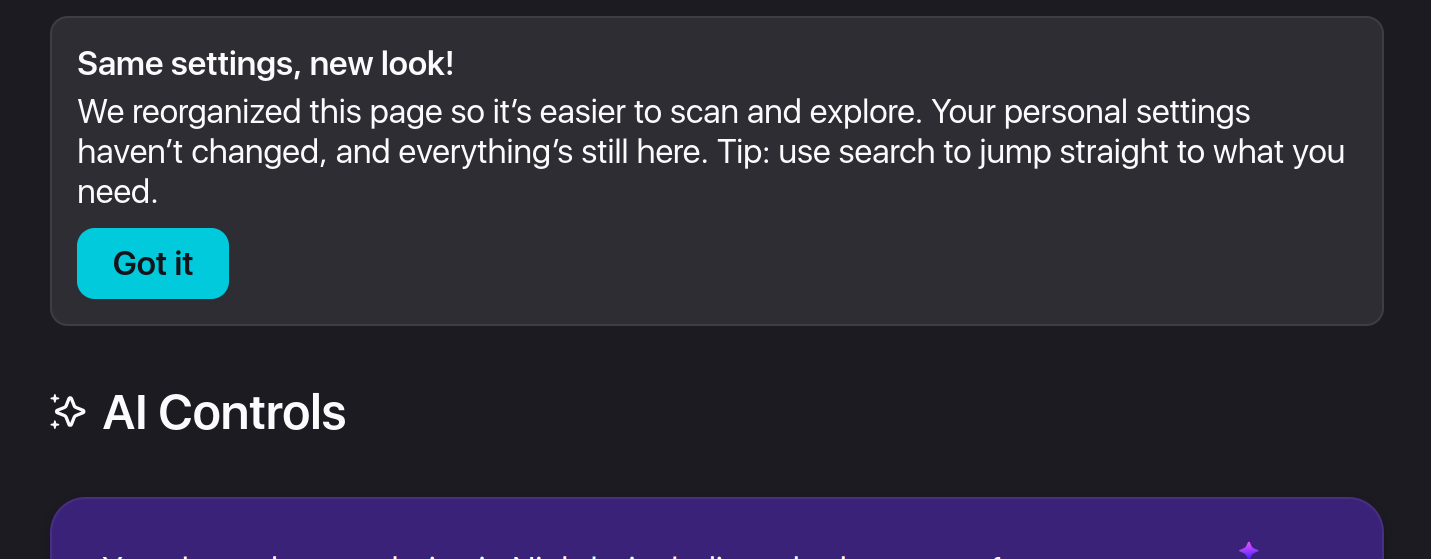
- Mark Kennedy added moz-promo, that is welcoming users to the redesigned settings Bug 2015093 – Add a moz-promo to welcome users to the redesign
- Anna added possibility to search for actions in the redesigned “Applications” section Bug 2020370 – It’s no longer possible to search for actions in the new “Applications” section
- Anna fixed the Settings navbar layout breakage
No comments yet
Post a comment